The local gateway behind AIAE.
AIAE routes each request to a domain adapter — EDA, software, documentation, automation. aegate is that routing and trust layer, running inside your premises. No account, no usage reports, no phone-home, no automatic updates.
The interface makes no promises. It shows what was actually checked, in plain words, and says so when something needs attention.
What it does
- Runs local and on-prem models through one OpenAI-compatible endpoint.
- Joins other aegate machines on the LAN so their RAM and GPUs can join the same fallback chains.
- Keeps paired devices chat-only; settings, keys and restart answer only on this PC.
- Keeps a local decision record without saving prompt text, and verifies its hash chain.
- Shows live local checks in the chat header and dashboard.
- Connects engineering tools through AIAE domain adapters, not through an outside service.
What it does not do
- No telemetry, analytics or usage reports.
- No account, no login, no device inventory sent anywhere.
- No cloud path is automatic; each request must be allowed first.
- No remote update, no licence server, no activation call home.
- No certification is claimed without evidence. The readiness note lists real gaps.
Where it sits
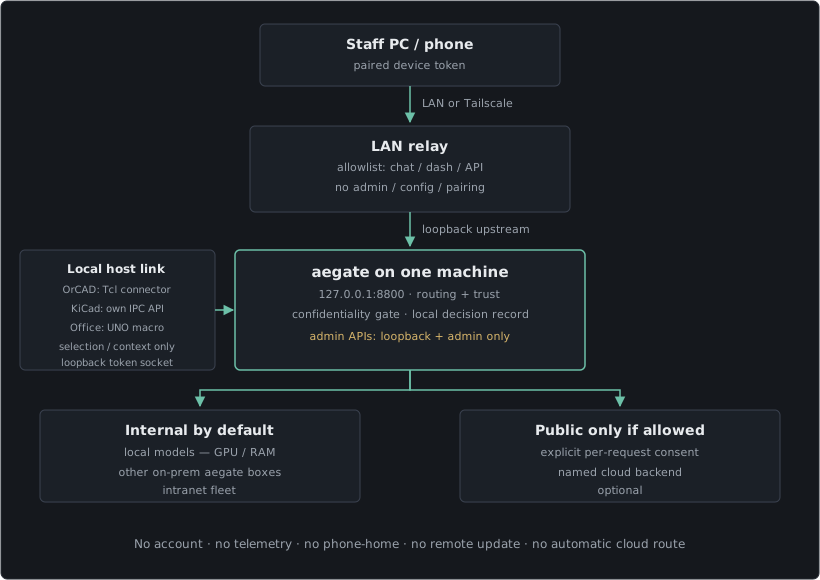
Static SVG, rendered from the same boxes as the architecture note in the source tree.
Fits the A2E Tech stack
aegate is the local AI layer beside Turnkey PCB and RF & SDR hardware, and it connects to MicRA industrial automation. AIAE is the engineering-facing platform; aegate is the part that keeps the models, routing and evidence on your own machines.
Engineering tools, connected locally
OrCAD Capture 17.4 / 26.1 has a vetted Tcl connector. It is installed into capAutoLoad only after you see the exact file, permissions and code, then gives aegate read-only design context over a local token socket: schematics, pages, parts, nets and properties.
KiCad 9+ is recognised through KiCad's own IPC API. No files are written into KiCad. It needs Enable KiCad API in Preferences and the kicad-python package installed for the router's Python. Today the adapter reports the KiCad version and basic board counts; it has no design-editing operation yet.
LibreOffice Writer / Calc gets one Python macro in your own user profile. You start it from Tools > Macros; it listens on loopback with a token and reads only the text or cells you have selected, up to fixed limits. There is no whole-document read and no document-editing operation.
None of these links has an eval operation or access to admin APIs. All stay inside the same private routing layer — not a separate cloud service.
aerouter — live design context, kept local
aerouter is the name for aegate's live-data routing layer, not a separate product or cloud service. On the designer's PC, a read-only connector carries the current selection or design context into aegate over a loopback token socket. Across a design team, the optional LAN relay lets paired devices reach allowlisted chat and dashboard paths on the team network.
Both halves stay on your premises. The connectors read only: no design edits and no whole-document read. The relay never forwards admin, config, pairing or device APIs. The product name stays aegate.
aerouter can also carry data between tools on one designer's PC. One sample: an OrCAD Capture bill of materials into LibreOffice Calc, then to a supplier such as DigiKey, and from there to a purchase-order tool such as FreeAgent. That is an illustration of the routing layer's reach, not a shipped feature: the connectors read only and cannot write into Calc, there is no supplier or purchase-order connector, and any cloud step would need explicit per-request consent.
Trust, shown rather than promised
The dashboard reports six checks using live local evidence: settings reachability, usage reporting, key storage, cloud permission, the decision record and where models run. Green means the check passed. Amber means something needs a look. Red means a real problem. Grey means not checked.
The operating system, browser and network client have their own telemetry settings. aegate does not control those and does not claim to.
Status and contact
Version 0.2.0rc4, internal beta. Ask for the AIAE readiness note, a reference deployment or support.